Best QR Code Menu Generator for Cafes and Coffee Shops in 2026
Quick Answer
Discover how cafes use QR code menus to cut costs and boost customer experience. OwnQR offers a $15 lifetime dynamic QR code generator with analytics and unlimited updates.
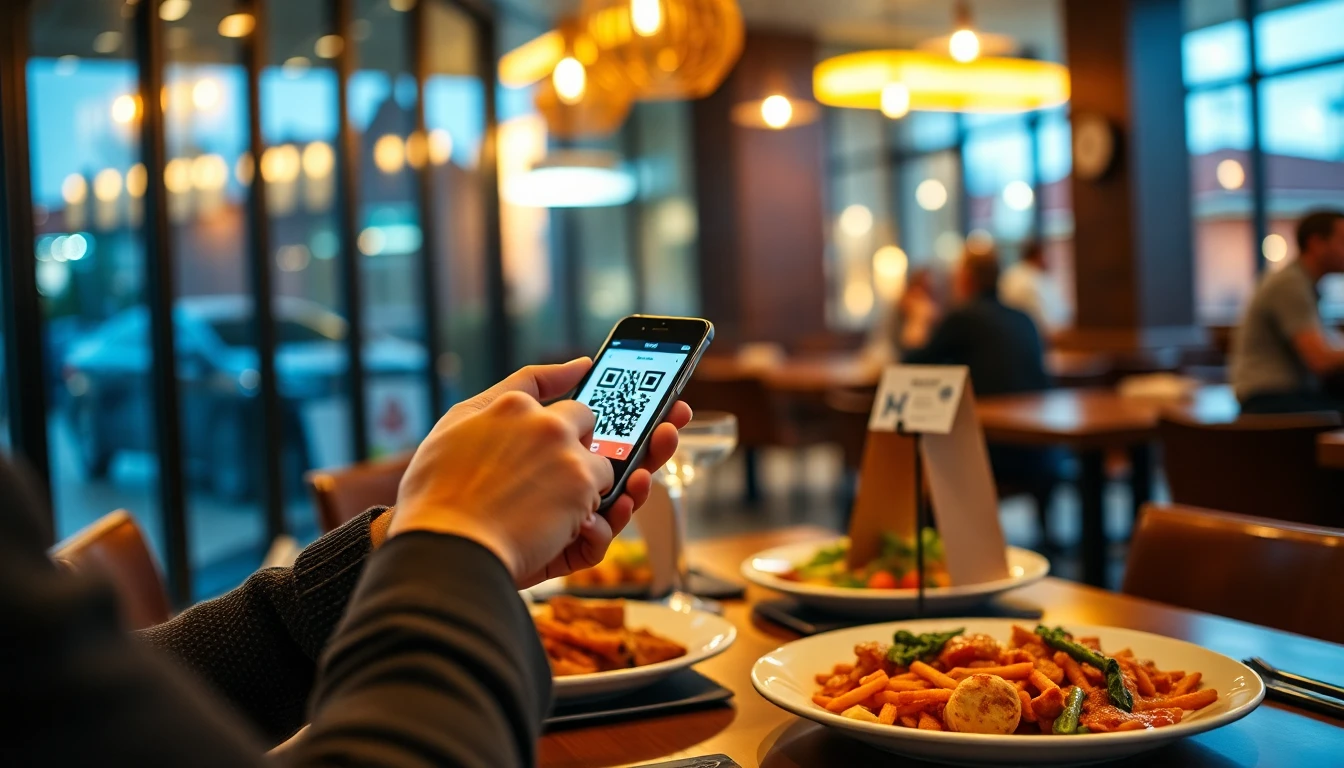
If you run a cafe or coffee shop, you know how quickly menus need updates. Seasonal drinks, price changes, and ingredient swaps happen constantly. Printing new menus costs money and creates waste. Paper menus also need frequent cleaning. A QR code menu solves these problems by letting customers scan and view your menu on their phones. You can update it anytime without reprinting anything. With OwnQR, you can get started with a $15 lifetime pricing plan that includes dynamic features, making it a cost-effective solution for small businesses.
Why QR Code Menus Work for Food Service
QR code menus became popular during the pandemic, but they offer lasting benefits. Customers appreciate the convenience of viewing menus on their own devices. They can zoom in on text, check allergen information, and even translate if needed. For your business, it reduces printing costs and staff time spent handing out menus. When you change your offerings, you update the digital menu once and the QR code stays the same. No more outdated menus on tables.
OwnQR provides a dedicated menu QR code generator that lets you create codes specifically for restaurant menus. You can start with a free static QR code that never expires, or choose a dynamic QR code for $15 as a one-time payment with no monthly fees. The dynamic option includes scan analytics so you can see when and where customers are viewing your menu.
Key Features to Look for in a Menu QR Generator
Not all QR code generators are equal for restaurant use. Here are the features that matter most for cafes and coffee shops:
Easy Updates: Your menu will change. Look for a generator that lets you edit the linked content without changing the QR code itself. Dynamic QR codes offer this flexibility. With OwnQR's dynamic codes, you can update your menu PDF or webpage as often as needed while the printed QR code remains valid.
Print Quality Options: You'll need to print your QR codes on table tents, window decals, or counter cards. The generator should offer high-resolution downloads. OwnQR provides both PNG and SVG formats. SVG files are vector-based, meaning they stay sharp at any size, which is ideal for professional printing.
Custom Design: Your QR code should match your cafe's branding. Look for customization options like colors, logos, and frames. A well-designed QR code looks more professional and encourages scanning. You can add your cafe's logo to the center of the code and use your brand colors for the pattern.
Analytics: Understanding customer behavior helps your business. Dynamic QR codes track scans, showing you location data, device types, and scan times. This tells you when customers are most likely to view your menu and helps with staffing decisions.
How to Create and Implement Your QR Menu
Follow these practical steps to set up your QR code menu system:
1. Prepare Your Digital Menu: Create a clean, readable version of your menu. This could be a PDF, a webpage, or a Google Doc. Make sure it's mobile-friendly with clear text and images. Include prices, descriptions, and any dietary information customers need.
2. Generate Your QR Code: Go to OwnQR's generator and select the menu option. Upload your menu file or enter the URL where it's hosted. Choose between a free static code (good if your menu rarely changes) or a $15 dynamic code (better for frequent updates and analytics). Customize the design with your colors and logo.
3. Download and Print: Download your QR code in SVG format for best print quality. The minimum size for reliable scanning is 2x2 cm for close-range use. For scanning from across a room, use this formula: scanning distance divided by 10 equals the minimum QR code size in centimeters. So a code meant to be scanned from 1 meter away should be at least 10 cm wide.
4. Place Strategically: Put QR codes where customers naturally look for menus: on tables, at the counter, near the entrance, and on window displays. Include simple instructions like "Scan to view our menu" with the code. Test each placement by scanning with different phones to ensure good readability.
5. Train Your Staff: Make sure your team knows how the system works. They should be able to help customers who aren't familiar with QR codes. Keep a few paper menus available for those who prefer them, but encourage QR code use for most customers.
Real-World Use Cases for QR Code Menus in Cafes
Implementing a QR code menu can transform operations for cafes and coffee shops. Here are three specific examples from 2026 that demonstrate the impact.
Brew & Bean Cafe, Seattle: This mid-sized cafe struggled with frequent menu changes due to seasonal coffee blends and pastry offerings. Before using OwnQR, they spent an average of $200 monthly on printing costs and faced customer complaints about outdated items. After switching to a dynamic QR code menu with OwnQR, they eliminated printing expenses entirely. Within three months, scan analytics showed a 40% increase in menu views during peak hours, allowing them to optimize staff scheduling. Customer satisfaction scores rose by 15%, as patrons appreciated the up-to-date digital menu accessible on their devices.
Urban Grind Coffee, New York City: A busy urban coffee shop with limited counter space needed a contactless solution to reduce clutter and improve hygiene. Previously, paper menus were often misplaced or soiled, requiring constant replacement. By implementing OwnQR's QR code menu, they placed codes on table tents and window decals. The result was a 30% reduction in menu-related waste and a smoother customer flow. Analytics revealed that 70% of scans occurred between 7-9 AM, prompting them to highlight breakfast specials during those times. This led to a 20% boost in morning sales.
Sunrise Bakery & Cafe, Austin: This family-owned cafe wanted to enhance its marketing efforts while managing a tight budget. They used OwnQR to create a QR code menu that linked to a webpage with detailed descriptions and high-quality images of their artisanal baked goods. Before, they relied on word-of-mouth and basic flyers. After deployment, they tracked over 500 scans in the first month, with 25% of users exploring additional pages like catering options. This direct engagement helped increase catering inquiries by 50%, demonstrating how a simple QR code can drive ancillary revenue streams without extra advertising costs.
Want to follow along? Create a Menu QR Code now
It's free to start. Upgrade to $15 lifetime when you need editable dynamic QR codes.
Step-by-Step: How to Do It with OwnQR
Setting up a QR code menu with OwnQR is straightforward and efficient. Follow these numbered steps to ensure a smooth implementation for your cafe or coffee shop.
1. Sign Up and Access the Generator: Visit the OwnQR website and navigate to the menu QR code tool. No account is needed for static codes, but creating a free account allows you to manage dynamic codes and access analytics. This step ensures you have the right platform for your needs, whether you choose a free or paid option.
2. Upload or Link Your Menu Content: Prepare your digital menu as a PDF, webpage, or Google Doc. Upload the file directly or paste the URL into OwnQR's interface. This flexibility lets you use existing digital assets, saving time and ensuring consistency with your brand's online presence.
3. Select Code Type and Customize Design: Choose between a static QR code (free, no changes allowed) or a dynamic QR code ($15 lifetime fee). For dynamic codes, customize the design by adding your cafe's logo, adjusting colors to match branding, and selecting a frame. This enhances visual appeal and encourages more scans from customers.
4. Download in High-Resolution Format: Download the QR code in SVG or PNG format. SVG is recommended for printing as it maintains quality at any size. This ensures your codes look professional on materials like table tents or window decals, reducing scanning errors.
5. Print and Test Placement: Print the QR code using a professional printer or in-house equipment. Test scanning from various distances and angles to confirm readability. Place codes in high-traffic areas like tables and counters, and include brief instructions to guide customers.
6. Monitor Analytics and Update Content: For dynamic codes, use OwnQR's dashboard to track scans, locations, and times. Update your menu content as needed—for example, adding seasonal drinks—without changing the QR code. This ongoing management helps you adapt to customer preferences and optimize operations.
Common Mistakes and How to Avoid Them
When implementing QR code menus, cafes often encounter pitfalls that can reduce effectiveness. Here are five common mistakes and practical ways to avoid them.
Using Low-Quality Images for Printing: Many businesses download QR codes in low-resolution formats, leading to blurry prints that fail to scan. To avoid this, always use SVG files from OwnQR, which are vector-based and remain sharp at any size. Test prints before mass production to ensure scanners on various smartphones can read the code easily.
Neglecting Mobile Optimization: Linking a QR code to a menu that isn't mobile-friendly frustrates customers, as text may be too small or images may not load properly. Before generating your code, check that your digital menu displays well on smartphones by testing it on different devices. Use responsive design or PDFs with clear, large fonts to enhance user experience.
Overlooking Staff Training: Without proper training, staff may struggle to assist customers unfamiliar with QR codes, causing delays and confusion. Conduct brief sessions to teach your team how the system works, including troubleshooting scanning issues. Keep backup paper menus available, but encourage staff to promote QR code use to streamline service.
Failing to Update Content Regularly: A static QR code linked to an outdated menu can mislead customers and harm your reputation. If your menu changes frequently, opt for OwnQR's dynamic code, which allows unlimited updates. Set reminders to review and refresh your digital menu seasonally or when prices change, ensuring accuracy.
Ignoring Analytics Data: Dynamic QR codes provide valuable insights, but some cafes don't review this data, missing opportunities to improve. Regularly check OwnQR's analytics dashboard to see peak scan times and customer locations. Use this information to adjust marketing strategies, such as highlighting popular items during busy hours.
Comparing QR Code Menu Solutions
Several companies offer QR code generators. QRFY provides menu QR codes with various features, though you should verify their current pricing and terms at qrfy.com. Bitly is known for link shortening but also offers QR codes with their service. Beaconstac focuses on business applications with different plan options.
What sets OwnQR apart is straightforward pricing: free static codes with no watermarks or sign-up required, and dynamic codes for a single $15 payment with lifetime access. There are no subscriptions, so you won't face recurring charges. The dynamic codes include analytics and unlimited edits to your linked content.
For cafes on tight budgets, the free static option works well if your menu stays mostly the same. If you change drinks seasonally or adjust prices regularly, the $15 dynamic code pays for itself quickly compared to printing costs. Both options let you download in SVG format for crisp printing.
Pricing Comparison: OwnQR vs. Subscription Alternatives
When choosing a QR code menu generator, pricing models vary significantly. Below is a detailed comparison table highlighting key differences between OwnQR and typical subscription-based alternatives. Note that competitor prices may change; always verify current rates at their official websites.
| Feature | OwnQR | Subscription Alternatives (e.g., QRFY, Bitly) |
|---|---|---|
| Pricing Model | $15 one-time payment for dynamic codes; free static codes | Monthly or annual subscriptions, often with tiered plans |
| Recurring Costs | None after purchase | Ongoing fees that can add up over time |
| Dynamic QR Codes | Included with lifetime access | Typically available in higher-tier plans |
| Analytics | Basic analytics included with dynamic codes | May require premium plans for detailed insights |
| Customization | Logo, colors, frames available | Often limited in basic plans |
| Updates and Edits | Unlimited for dynamic codes | May restrict edits based on plan |
| Print Formats | SVG and PNG downloads | Commonly offer standard formats |
OwnQR's $15 lifetime pricing offers exceptional value for cafes and coffee shops, especially small businesses with limited budgets. Unlike subscription models that charge monthly fees—which can total hundreds of dollars annually—OwnQR provides a one-time cost with no hidden charges. This makes it ideal for establishments that need dynamic features like analytics and unlimited updates without ongoing expenses. Subscription alternatives may offer more advanced analytics or integrations, but for basic menu functionality, OwnQR covers all essentials. Over a year, a typical subscription service might cost $5-20 per month, totaling $60-240, whereas OwnQR's $15 fee is a fixed investment. Additionally, OwnQR's free static option is perfect for cafes with stable menus, while the dynamic code supports frequent changes. When evaluating options, consider your update frequency and need for data; for most cafes, OwnQR delivers cost-effective, reliable performance without long-term commitments.
Frequently Asked Scenarios
Cafe owners often have specific questions about implementing QR code menus. Here are four detailed scenarios with practical answers.
Q: How can I use a QR code menu to promote seasonal specials without confusing customers?
A: With OwnQR's dynamic QR code, you can update your digital menu to highlight seasonal items like pumpkin spice lattes in fall. Change the linked content to feature these specials at the top, with clear images and descriptions. Since the QR code itself remains the same, customers scanning it will always see the latest offerings. This approach reduces waste from printed flyers and allows real-time promotions, boosting sales during peak seasons.
Q: What if my cafe has limited internet access for customers?
A: Ensure your digital menu is lightweight and loads quickly, even on slower connections. Use OwnQR to link to a simple PDF or optimized webpage. Consider providing free Wi-Fi for customers, but also test the menu offline to guarantee accessibility. Place QR codes in areas with good signal, and train staff to assist if issues arise. This minimizes frustration and ensures a smooth experience for all patrons.
Q: Can I track how many customers view my menu with a QR code?
A> Yes, OwnQR's dynamic QR codes include basic analytics that track total scans, locations, and times. This data helps you understand customer behavior, such as peak viewing hours. Use these insights to adjust staffing or menu highlights. For example, if scans spike in the afternoon, you might promote coffee refills or pastries during that time to increase sales.
Q: How do I integrate a QR code menu with other digital tools like a vCard for contact sharing?
A> OwnQR offers specialized tools, such as a vCard QR code generator, that can complement your menu system. For instance, you could place a vCard QR code near the register for customers to save your contact details, while the menu QR code is on tables. This creates a cohesive digital ecosystem, enhancing customer engagement without cluttering physical space.
Ready to simplify your cafe's menu management? Create your QR code menu today at OwnQR. The process takes minutes, and you can start with a free code to test the system. For frequent menu changes and customer insights, the $15 dynamic code offers excellent value with no ongoing costs. Explore more solutions like a restaurant menu QR code solution to streamline operations further and enhance your service in 2026.
Tags
Frequently Asked Questions
How do QR code menus benefit coffee shops specifically?
QR code menus help coffee shops update seasonal drinks and prices without reprinting. They reduce paper waste and cleaning time. For example, a cafe changing its summer to fall menu can update the digital version instantly. OwnQR's dynamic codes cost $15 once and include scan analytics to track customer engagement with different menu sections.
What size should a QR code menu be for table use?
For table tents or cards where customers scan from about 30 cm away, use a minimum size of 2x2 cm. For wall signs meant to be scanned from 1 meter away, make the code at least 10 cm wide (scanning distance divided by 10). Always test with multiple phones before final printing to ensure reliable scanning.
Can I change my menu after printing the QR codes?
Yes, with dynamic QR codes. These let you edit the linked content without altering the printed code. For instance, if you add a new pastry or adjust coffee prices, you update the digital menu and all existing codes reflect changes. OwnQR offers dynamic codes for $15 with lifetime access and unlimited edits, no subscription needed.
Why choose SVG format for printed QR codes?
SVG files are vector-based, meaning they maintain perfect sharpness at any size. When printed on table tents, window decals, or promotional materials, SVG ensures clean edges and no pixelation. PNG files work for digital use but may blur when enlarged. Most professional printers recommend SVG for crisp results on physical materials.
What's the best alternative to subscription-based QR services?
OwnQR provides a cost-effective alternative with no subscriptions. Their free static codes have no watermarks, while dynamic codes cost $15 as a one-time payment with lifetime access. This contrasts with services like QRFY or Bitly that typically use monthly billing models. For cafes wanting predictable costs, OwnQR eliminates recurring fees while offering analytics and editable codes.
Ready to own your QR codes?
One-time $15 for lifetime dynamic QR codes.
Most alternatives bill monthly — verify current rates on their site.
30-day money back guarantee