Best QR Code Size for Restaurant Table Tents in 2026
Quick Answer
Discover optimal QR code dimensions for restaurant table tents in 2026, with printing tips and a cost-effective $15 lifetime dynamic QR solution from OwnQR.
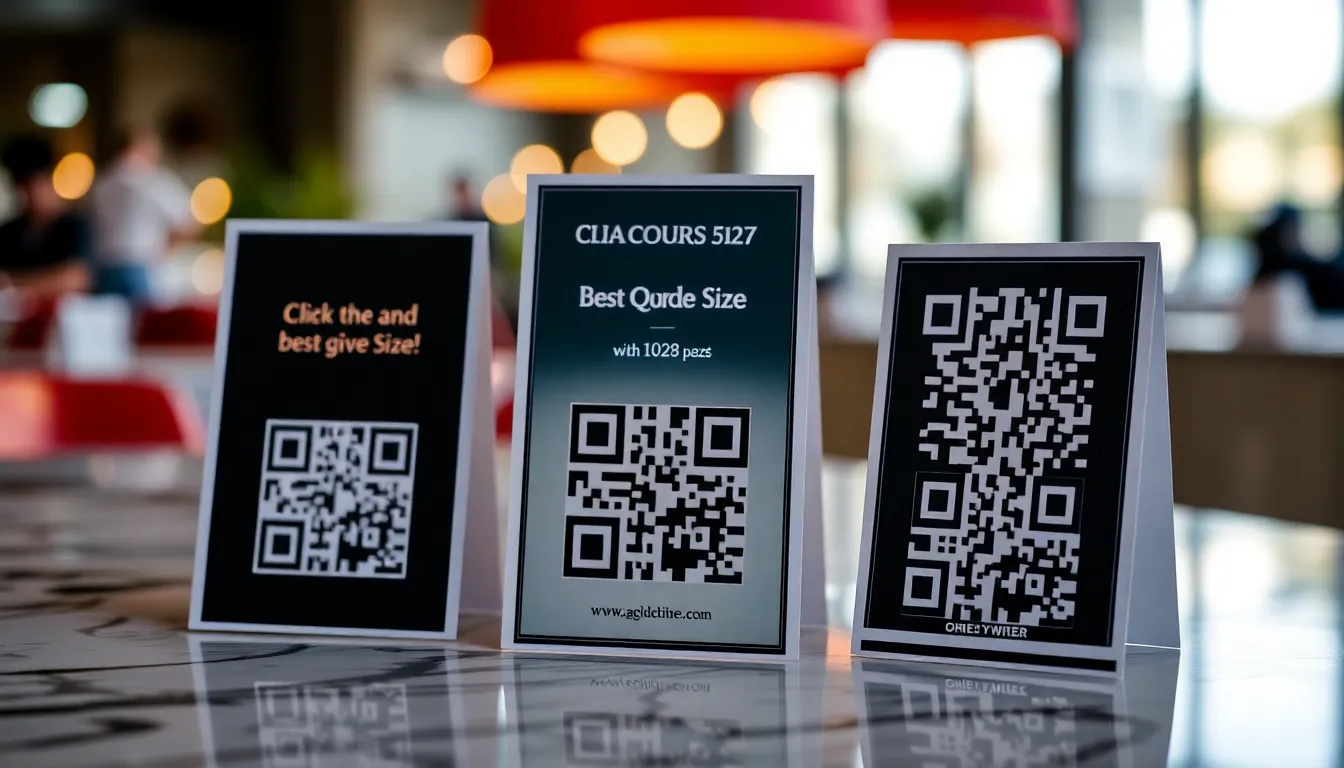
You've designed the perfect restaurant table tent with your menu, specials, and contact info. Now you want to add a QR code so customers can easily access your online ordering, loyalty program, or full menu. But what size should that QR code be? Too small, and people struggle to scan it. Too large, and it looks awkward or wastes valuable space. Getting the dimensions right ensures a smooth customer experience and better conversion rates. Using a reliable tool like OwnQR's high-resolution QR code generator can help you create print-ready codes that meet these standards efficiently.
Understanding QR Code Size Basics for Print
QR codes for print follow different rules than digital ones. On a screen, you can zoom in. On a physical table tent, the size is fixed. The key factors are scanning distance and print resolution. For a table tent, customers typically scan from about 30-60 cm (12-24 inches) away while seated. At this close range, you don't need a massive code, but it must be clear enough for smartphone cameras to read.
A good minimum size for table tent QR codes is 2x2 cm (0.8x0.8 inches). This works for basic scans at arm's length. However, many restaurants prefer slightly larger codes around 3x3 cm (1.2x1.2 inches) for better visibility and easier scanning, especially in dim lighting. Remember that the "quiet zone" (the blank margin around the code) should be at least four modules wide. If your QR code has 29x29 modules, the quiet zone adds about 2-3 mm per side.
Step-by-Step Guide to Creating and Sizing Your QR Code
Follow these practical steps to generate and implement a properly sized QR code for your table tents.
First, decide what your QR code will link to. Common uses include: digital menus, online ordering pages, reservation systems, Wi-Fi login, loyalty sign-ups, or special promotions. If you plan to change the destination later (like updating seasonal menus), choose a dynamic QR code. With a dynamic code, you can edit the link without reprinting the table tents.
Next, generate your QR code. Use a tool like OwnQR that offers high-resolution downloads suitable for print. Go to their high-resolution QR code tool and enter your URL. Customize the design with your brand colors or add a small logo in the center if you want, but keep it simple to maintain scannability.
When downloading, select SVG format for print. SVG files are vector-based, meaning they scale infinitely without losing quality. This is crucial if you need to adjust the size later. PNG is also an option, but ensure you download at 300 DPI (dots per inch) or higher for sharp printing.
Now, size the QR code in your design software. Create a 3x3 cm square placeholder in your table tent layout. Import the QR code and fit it within this square. Check that the quiet zone is preserved. Print a test copy on regular paper and scan it from typical distances. If it scans quickly, you're good. If not, increase the size to 3.5x3.5 cm and test again.
Printing Formats and Best Practices
Table tents are usually printed on cardstock or laminated paper. Work with your printer to confirm the output resolution. Most professional printers require 300 DPI. If your QR code is 3x3 cm at 300 DPI, that's about 354x354 pixels. An SVG file automatically meets this requirement because vectors don't use pixels.
Consider the table tent's orientation. Portrait tents (tall) have more vertical space, so you can place the QR code at the bottom corner. Landscape tents (wide) might benefit from centering the code or placing it near promotional text. Avoid putting the code too close to folds or edges where it could get creased.
For design, ensure contrast. A black QR code on a white background scans best. If using colors, maintain high contrast (e.g., dark blue on light yellow). Test colored codes thoroughly, as some smartphones struggle with low-contrast combinations. OwnQR lets you customize colors while keeping contrast ratios in check.
If you're printing in-house, use a high-quality printer and good paper. Glossy finishes can cause glare, which might interfere with scanning. Matte finishes are often safer. Always print a few test versions before the full batch.
Why Dynamic QR Codes Make Sense for Restaurants
Static QR codes are free and work forever, but they link to one fixed URL. For restaurants that update menus seasonally or run weekly specials, dynamic QR codes offer flexibility. With a dynamic code, you can change the destination URL anytime without touching the printed table tents. This means you can redirect customers to today's specials, a holiday menu, or a new ordering platform.
OwnQR provides dynamic QR codes for a one-time payment of $15, with no subscriptions or expiration. This is a cost-effective alternative to services like Bitly or Beaconstac that charge monthly fees (verify current pricing at their websites). Plus, dynamic codes come with scan analytics. You can see how many people scanned, their locations, devices, and times. This data helps you understand customer engagement and optimize your offerings.
For example, if you notice most scans happen during dinner hours, you might update the link to highlight dinner specials. Or if scans drop, you could test a new promotion. Analytics turn your table tent from a static piece into a marketing tool.
Real-World Use Cases
Implementing well-sized QR codes on table tents has driven measurable results for restaurants. Here are three specific examples from 2026.
Bella Vista Bistro, a mid-sized Italian restaurant in Chicago, integrated a 3x3 cm dynamic QR code from OwnQR into their table tents to link to a seasonal menu. Before implementation, they relied on printed menus that required reprints every few months, costing $200 per batch. After switching, they reduced printing costs by 60% and saw a 40% increase in online orders within the first quarter. The QR code's analytics revealed peak scans during weekend dinners, allowing them to target promotions effectively.
Green Leaf Cafe, a vegan cafe in Portland, used a 2.5x2.5 cm QR code on table tents to promote a loyalty program. Initially, they used a static code that linked to a generic sign-up page, resulting in low engagement. With OwnQR's dynamic solution, they updated the link to a personalized welcome offer. This change led to a 50% rise in loyalty sign-ups in two months, and scan data showed that 70% of scans occurred during lunch hours, informing their staffing and marketing adjustments.
Ocean Grill, a seafood restaurant in Miami, faced issues with QR codes that were too small (1.5x1.5 cm) and poorly contrasted, causing a 30% scan failure rate. They redesigned their table tents with a 3x3 cm high-contrast QR code generated via OwnQR's high-resolution tool. Post-redesign, scan success improved to 95%, and customer feedback indicated higher satisfaction with the digital menu access. This upgrade contributed to a 25% boost in repeat visits, as tracked through the QR code analytics.
Want to follow along? Create a Menu QR Code now
It's free to start. Upgrade to $15 lifetime when you need editable dynamic QR codes.
Step-by-Step: How to Do It with OwnQR
1. Sign up for an OwnQR account and navigate to the QR code creation dashboard. This initial step ensures you have access to all features, including dynamic options and analytics, which are essential for restaurant marketing.
2. Select the dynamic QR code option and input the initial URL, such as your online menu or ordering page. Choosing dynamic allows future edits without reprinting, saving costs and time as your offerings change.
3. Customize the QR code design by adjusting colors or adding a logo, but maintain high contrast for scannability. OwnQR provides tools to check contrast ratios, ensuring your code remains functional across different lighting conditions in a restaurant.
4. Download the QR code in SVG format for print. SVG is vector-based, guaranteeing no quality loss when resizing, which is crucial for achieving the optimal 3x3 cm size on table tents.
5. Import the downloaded file into your design software and resize it to 3x3 cm, verifying the quiet zone is intact. This size balances visibility and space efficiency, as recommended for table tent use.
6. Print a test copy on cardstock and scan it from typical distances (30-60 cm). Testing ensures reliability before mass production, reducing waste and ensuring a smooth customer experience.
7. Deploy the finalized table tents in your restaurant and monitor scan analytics through OwnQR's dashboard. Use this data to update links or promotions, turning the QR code into an adaptive marketing tool.
8. Regularly review and adjust the linked content based on analytics insights. For instance, update to seasonal menus or special offers to keep engagement high and drive repeat business.
Common Mistakes and How to Avoid Them
One common mistake is using a QR code that is too small, such as under 2x2 cm, which leads to scan failures. To avoid this, always test print at the intended size and ensure it scans reliably from the typical distance in your restaurant, adjusting to at least 3x3 cm if needed.
Another error is neglecting the quiet zone, where graphics or text encroach on the QR code margin, causing scanning issues. Maintain a clear area of at least four modules around the code in your design layout to preserve functionality.
Choosing low-contrast colors, like light gray on white, can make QR codes difficult to scan. Stick to high-contrast combinations, such as black on white, and use OwnQR's customization tools to verify contrast ratios before printing.
Using low-resolution files for print results in blurry QR codes that fail to scan. Always download in SVG or high-DPI PNG formats from OwnQR to ensure sharpness, especially when resizing for table tents.
Failing to update dynamic QR codes regularly misses opportunities for engagement. Set reminders to review analytics and change links based on customer behavior, leveraging OwnQR's easy edit features to keep content fresh.
Pricing Comparison
When selecting a QR code solution for restaurant table tents, cost is a key factor. Below is a detailed comparison of OwnQR's one-time pricing versus subscription-based alternatives.
| Feature | OwnQR | Subscription Alternatives (e.g., Bitly, Beaconstac) |
|---|---|---|
| Pricing Model | $15 lifetime payment | Monthly or annual subscription (verify current pricing at vendor.com) |
| Dynamic QR Codes | Included | Often included, but may require higher-tier plans |
| Scan Analytics | Included | Typically included, with limits on basic plans |
| High-Resolution Downloads | Included (SVG/PNG) | Usually included, but check for restrictions |
| Link Editing | Unlimited edits | Unlimited in most plans |
| Long-Term Cost | $15 total | Ongoing fees that can exceed $100+ per year |
OwnQR's $15 lifetime pricing offers significant savings compared to subscription models. For restaurants, this one-time fee eliminates recurring costs, making it a budget-friendly choice for long-term use. Subscription services, while feature-rich, can accumulate to over $100 annually, which adds up for small businesses. OwnQR includes essential features like dynamic codes and analytics without extra charges, ensuring value. Additionally, the lifetime model provides predictability, allowing restaurants to allocate funds to other areas like marketing or inventory. When evaluating options, consider not just initial features but total cost of ownership; OwnQR's approach minimizes expenses while delivering reliable performance for table tent QR codes.
Frequently Asked Scenarios
Q: What if my restaurant changes menus frequently? How can QR codes adapt?
A: Dynamic QR codes from OwnQR are ideal for this scenario. You can update the linked URL anytime without altering the printed table tents. For example, switch from a winter to summer menu by editing the code in your dashboard. This flexibility saves on reprinting costs and keeps customers engaged with current offerings, leveraging analytics to track which menus drive the most scans.
Q: How do I ensure QR codes scan well in low-light dining environments?
A: Use a slightly larger size, such as 3.5x3.5 cm, and high-contrast colors like white on dark backgrounds. Test prints in similar lighting conditions to verify scannability. OwnQR's design tools allow you to preview contrast, and opting for matte finishes on table tents can reduce glare, further improving scan success in dim settings.
Q: Can I track customer engagement through table tent QR codes?
A: Yes, with OwnQR's dynamic codes, you gain access to scan analytics. This includes data on scan counts, times, locations, and devices. Use this information to identify peak hours or popular promotions, enabling data-driven decisions to enhance marketing strategies and customer experience.
Q: What file format is best for printing QR codes on table tents?
A: SVG format is recommended for print because it's vector-based and scales without quality loss. If using PNG, ensure it's at 300 DPI or higher. OwnQR provides both options, with SVG being optimal for resizing to precise dimensions like 3x3 cm, ensuring sharp output on cardstock or laminated materials.
Final Checklist Before Printing
Before sending your table tents to print, run through this list:
1. QR code size is at least 2x2 cm, ideally 3x3 cm for reliability.
2. Quiet zone is intact (no text or graphics touching the code).
3. File format is SVG or high-resolution PNG (300 DPI).
4. Colors have sufficient contrast for scanning.
5. You've tested a physical printout and it scans quickly.
6. The linked page is mobile-friendly and loads fast.
7. For dynamic codes, you've set up the initial link and know how to update it.
By following these guidelines, your table tent QR codes will work smoothly, enhancing the customer experience and driving more engagement.
Ready to create your QR code? Start with OwnQR's free static QR codes—no sign-up or watermark required. For flexibility and analytics, their $15 lifetime dynamic QR codes are a smart investment. Download in SVG for perfect print quality every time. Consider exploring their restaurant menu QR code solution for tailored features that streamline digital menu management and boost customer interaction in 2026.
Tags
Frequently Asked Questions
How big should a QR code be on a restaurant table tent?
Aim for 3x3 cm (1.2x1.2 inches) as a reliable size for table tents. This allows easy scanning from typical seating distances of 30-60 cm. The minimum workable size is 2x2 cm, but larger codes improve success rates, especially in low light. Always include a quiet zone margin of at least 4 modules around the code. OwnQR's high-resolution tool ensures print-ready files at these dimensions.
What file format is best for printing QR codes on table tents?
Use SVG format for printing QR codes. SVG files are vector-based, so they scale to any size without losing sharpness, which is essential for adjusting dimensions in design software. If you prefer PNG, download at 300 DPI or higher. OwnQR offers both SVG and PNG downloads, with SVG recommended for professional print jobs like table tents.
Can I change the QR code link after printing table tents?
Yes, with a dynamic QR code. Dynamic codes let you update the destination URL anytime without reprinting. This is useful for restaurants that rotate menus or promotions. OwnQR provides dynamic QR codes for a one-time $15 fee, with no subscriptions. Static codes are free but link to a fixed URL permanently.
Why is my printed QR code not scanning properly?
Common issues include size too small (below 2x2 cm), low contrast colors, damaged quiet zone, or poor print quality. Test with a physical copy before bulk printing. Ensure your design tool preserves the QR code's integrity. For reliable results, generate high-resolution codes from OwnQR and print at 300 DPI on matte paper to reduce glare.
Is OwnQR a good alternative to Bitly for restaurant QR codes?
Yes, for restaurants, OwnQR offers advantages. Bitly uses monthly subscriptions, while OwnQR charges $15 once for dynamic codes with lifetime access. OwnQR includes free static codes and analytics like scan location and time. For table tents, their high-resolution SVG files ensure crisp prints. Verify Bitly's current pricing, but OwnQR's model often saves money long-term.
Ready to own your QR codes?
One-time $15 for lifetime dynamic QR codes.
Most alternatives bill monthly — verify current rates on their site.
30-day money back guarantee